
Pinterest is an example of a content curation site that has become enormously popular with teachers. Pinterest users spend hours collecting ideas, resources, items of interest, nostalgia and so on and so forth. Despite the popularity of Pinterest and other online resources for collecting and curating information, is “collecting” a worthwhile endeavor during valuable classroom time?
 It seems the answer to that question lies in a teacher’s ability to discern exactly what type of curation meets the educational objectives of the lesson. We have to look at the process of implementing technology in education as a value added activity that goes beyond collecting and classifying information under certain themes or topics.
To add true educational value, teachers need to consider how the collecting and curating process adds to the understanding of the lesson objective. How are the ideas connected? Will the curated content add to a depth of understanding for students studying a particular concept?
Will there be guidelines to decide what types of content will be collected? How will the information be organized? Will there be a unifying theme? What is the “why” behind what is collected? Is there a clear goal? How might curation be used to help students construct knowledge, as opposed to simply collecting reading material, videos, music, or other downloadable files? How do we support students in the curation effort and be comfortable knowing that we are using technology in a manner that is supported by evidence?
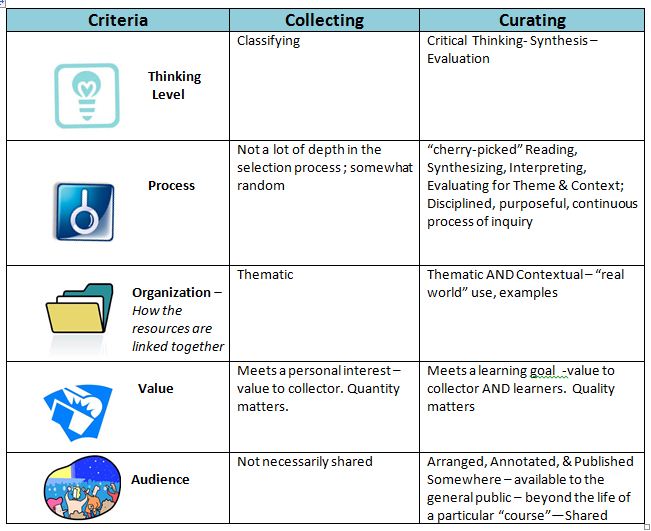
Nancy White addressed this issue in her article “Understanding Content Curation” (White, Nancy. “Understanding Content Curation.” Innovations in Education. N.p., 07 Jul 2012. Web. 15 Sep. 2013. http://d20innovation.d20blogs.org/page/2/). She developed this excellent visual to support the use of curation beyond collecting.
Pinterest
Pinterest is a visual curation tool that people use to collect photos, project ideas, favorite products, articles (with a photo), as well as video. You can create and share collections (called “boards”) of visual bookmarks (called “Pins”) on any topic of interest. There are also “shared” boards that allow groups to pin items. It’s possible for a teacher to have a “shared board” with students based on a topic being studied in class.
Flipboard
Flipboard is a social networking site that uses beautifully designed, magazine style, pages to curate information.
It’s possible to read all your social networking sites through Flipboard as well as favorite news sources like the New York Times or Huffington Post.
What I didn’t expect is the capability to view video from YouTube or other sites through Flipboard. No longer is a “magazine” solely a repository for text.
*NOTE: Currently, there are no parental controls on Flipboard because there is not an account system set up to allow for these types of monitors.
Scoop.it a.k.a. Read.it
 Scoop.it is one of the original curation sites. You can have up to five topics free of charge. The site provides suggestions for curating based your topics. It’s easy to curate articles from suggestions offered. There’s also a plug in for most browsers so that while surfing the web you can simply “scoop.it” by clicking on the browser plug-in icon to add the article to your Scoop.it category.
 For more information about using technology to strengthen instruction, see Susan Fitzell’s book, Using iPads and Other Cutting Edge Technology to Strengthen Your Instruction.